
eLab Logo

Assigning Samples to a Worklist

As samples complete tasks they are assigned to a worklist corresponding to the next protocol in a method. The assignment of samples to worklists can take place at the time of completion of a task or at a later point via the project management screen. Using the project management screen to assign tasks allows managers to maintain tighter controls over the progress of samples.

To assign samples to a worklist, follow these steps:
  1. Display the project and select one or more samples from the same column .
    Note: Use the Select drop down button to quickly select a group of samples.
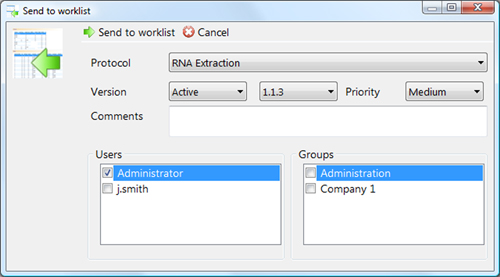
  2. Click the Worklist button from the Send To group . The Send To Worklist dialog box appears.

    Send to worklist
    Figure 5.5. The Send to worklist dialogue box.

  3. Select the name of the Protocol of the worklist you wish to assign the samples to.
  4. Choose the Version and Version Number.
  5. Set a Priority for the samples
  6. Assign the samples to a particular user or group.
  7. Click Send To Worklist.